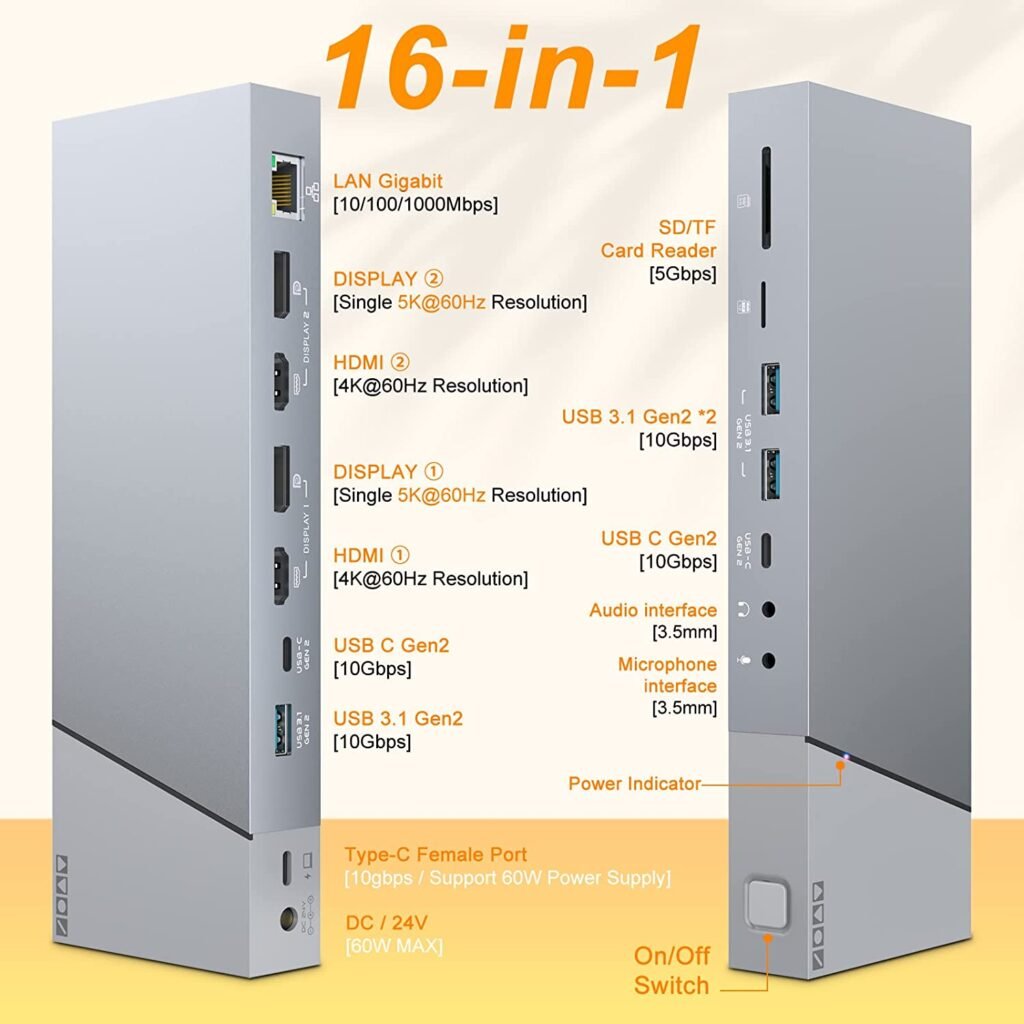
DL6950 DisplayLink Docking Station Product Name: DL-6950 DisplayLink DockBullet:Up to Triple Display for Productivity.Single-Cable 60W Charging.Ideal for Office & SMB Deployments.Use Scenarios: Enterprise / Home Office / IT Deployment Request a Quote Why This Dock?Supports up to 2 external displays via DisplayLinkCompatible with MacBook M1/M2/M3, Windows laptops, and moreIdeal for IT bulk deployment and multi-monitor productivityStable performance for finance, trading, coding, and remote work Ports:DC Power 24VType C Connect WithPC/PD Charging PortUSB 3.1 Gen2 *3USB-C Gen2 *3HDMI Port *2DP Port *2RJ45 Gigabit Ethernet PortSD/TF Card Slot3.5mm Audio/Mic Jack Technical Specs ChipsetDisplayLink DL-6950 Max DisplaysUp to 3 external monitors Max Resolution4K 60Hz Host InterfaceUSB-C/USB-A OS SupportWindows, macOS, Linux Driver RequiredYes (DisplayLink driver) Power DeliveryUp to 60W CertificationCE / FCC / RoHS Compatible DevicesmacOS 10.6.2 and future releases Windows XP and future releasesLinux Fedora FC8 and future releases Driver RequiredThis product uses DisplayLink technology and requires the official DisplayLink driver.👉 Download from DisplayLink Use Cases Enterprise IT Deployment Home Office Multi-Screen Setup Trading & Financial Workstations Software Development & IT Operations OEM / ODM Services Available Custom logo printingPackaging and branding supportBulk order support Looking for bulk pricing or custom solutions?Tell us your requirements and our team will respond within 24 hours. Please enable JavaScript in your browser to complete this form.Please enable JavaScript in your browser to complete this form.Name *Email * Requirements Email / Message / Requirements *Request Custom Solution Driver Download & Support Download DisplayLink Driver Installation Steps:1. Download the latest driver from DisplayLink.2. Install and restart your system.3. Connect your docking station and monitors.